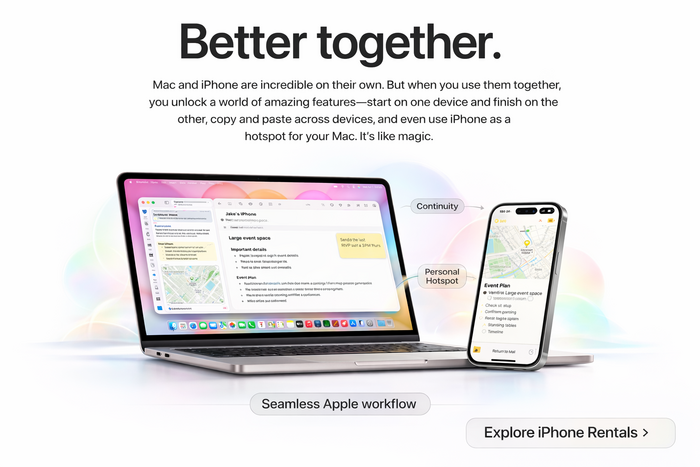
Better together.
Apple Rentals • Workflow • Production • Events
Rent Macs & iPhones Together for a Seamless Apple Workflow
When you pair a Mac with an iPhone, you unlock the best of the Apple ecosystem—fast file transfers, continuity features, and reliable connectivity. For productions, corporate teams, and events, renting both devices together is one of the easiest ways to deploy a modern, high-performance workflow without friction.
Why rent both?
- Faster workflows: move files, notes, and media between devices without cables.
- Better reliability: iPhone hotspot can keep your Mac online when Wi-Fi is unstable.
- Cleaner setups: fewer adapters and less troubleshooting for teams.
- Scalable deployments: ideal for productions, events, trainings, and corporate rollouts.
The Apple Ecosystem Advantage (and why it matters when you rent)
Apple devices are designed to operate as a single connected system. That means your Mac rentals and iPhone rentals can be configured to work together with minimal setup, making them a powerful choice for teams that need speed, reliability, and consistency.
Instead of stitching together multiple brands and apps, you get an integrated workflow where connectivity features are built-in. For many clients, this eliminates “tech friction” and reduces downtime—especially when multiple people need to collaborate quickly.
1) Continuity: start on iPhone, finish on Mac
Continuity features make it easy to move between devices without breaking your flow. You can begin drafting a message, reviewing notes, or collecting information on an iPhone, then seamlessly continue on a Mac with a larger screen and full desktop tools.
2) AirDrop: cable-free file transfers in seconds
Need to send photos, videos, PDFs, spreadsheets, or project files from an iPhone to a Mac? AirDrop is one of the fastest ways to move content between devices—no drives, no email attachments, no “which cable do we need?” moments.
3) Universal Clipboard: copy on iPhone, paste on Mac
Copy a link, address, phone number, or snippet of text on an iPhone, then paste it directly onto a Mac. This is small—but for teams doing repeated tasks (check-in, ticketing, data entry, logistics), it adds up quickly.
4) iPhone Personal Hotspot: built-in backup internet
When Wi-Fi is unreliable—common at venues, on location shoots, pop-up events, and outdoor setups—an iPhone can act as a backup connection for your Mac. This can be a lifesaver for quick uploads, approvals, and real-time communication.
Real-World Use Cases: Productions, Events, and Corporate Teams
Renting Macs and iPhones together is common in environments where speed and reliability matter—especially when a team is working under deadlines and needs gear that simply works.
Filming & Content Production
Use iPhones for interviews, BTS, social captures, or mobile content, and move media quickly to Mac systems for editing, exporting, organizing, or uploading. Ideal for tight turnaround workflows.
Event Check-In & Registration
Deploy iPhones for scanning, ticket validation, or attendee workflows while Macs run dashboards, reporting, and support tools. A clean Apple setup keeps teams moving and lines short.
Corporate Deployments & Trainings
Perfect for onboarding, offsites, workshops, and multi-day trainings. Rentals let you scale up quickly, keep devices consistent, and return everything when the project is complete.
Mobile Teams & Field Operations
For field staff, canvassing, outreach, and distributed teams, iPhones keep workers connected while Macs handle coordination, data consolidation, and reporting—without complex IT overhead.
Why Rent Macs & iPhones Instead of Buying?
Renting makes sense when you need Apple gear for a project, event, or production—without long-term ownership costs.
- Scale up fast for short-term needs (days, weeks, or months).
- Standardize your fleet so every team member has the same device experience.
- Reduce downtime with consistent, proven configurations.
- Stay flexible as staffing, schedules, and scope change.
Build Your Apple Rental Bundle
If you’re planning a production, event, training, or large deployment, renting a matched set of Macs and iPhones is one of the fastest ways to get a dependable setup. We can help you choose the right mix of devices and get everything ready to deploy.
Tip: Link this blog post from your iPhone and Mac rental pages for stronger internal SEO.
Apple Rentals for Productions, Events, and Business Teams
Whether you need a single device or a fleet, renting Apple hardware can simplify your workflow. Teams use Mac and iPhone rentals for filming, interviews, livestream support, event registration, corporate trainings, mobile deployments, and fast-moving projects that require dependable technology.
If you’re searching for iPhone rentals or Mac rentals and want the easiest way to keep everything connected, building a paired Apple setup is a proven approach—fast to deploy, consistent to use, and easy to scale.
FAQ: Renting Macs & iPhones Together
Do Macs and iPhones work together automatically?
In most cases, yes. Many Apple ecosystem features are built into macOS and iOS. For managed deployments, rentals can be configured in advance so teams can start working immediately.
Can an iPhone provide internet to a Mac on location?
Yes—an iPhone can share a connection using Personal Hotspot. This is especially useful on set, at venues, or in temporary workspaces when Wi-Fi is inconsistent.
What’s the fastest way to transfer videos from iPhone to Mac?
AirDrop is a popular option for quick transfers without cables. For large-scale workflows, teams often use a combination of AirDrop, local network shares, or cloud syncing depending on project requirements.
Where do I start if I need both Macs and iPhones?
Start with the device list and timeline. If you need phones for scanning/check-in or mobile filming and Macs for editing, dashboards, or coordination, pairing rentals is typically the simplest route.
Ready to Rent?
Get a paired Apple setup that’s fast to deploy and easy for teams to use—whether it’s for filming, events, trainings, or large rollouts.